 Hunter Watch
See how the day unfolded.
A route tells you where you went. Replaying it alongside the day’s activity helps you remember the walking, waiting and moments in between.
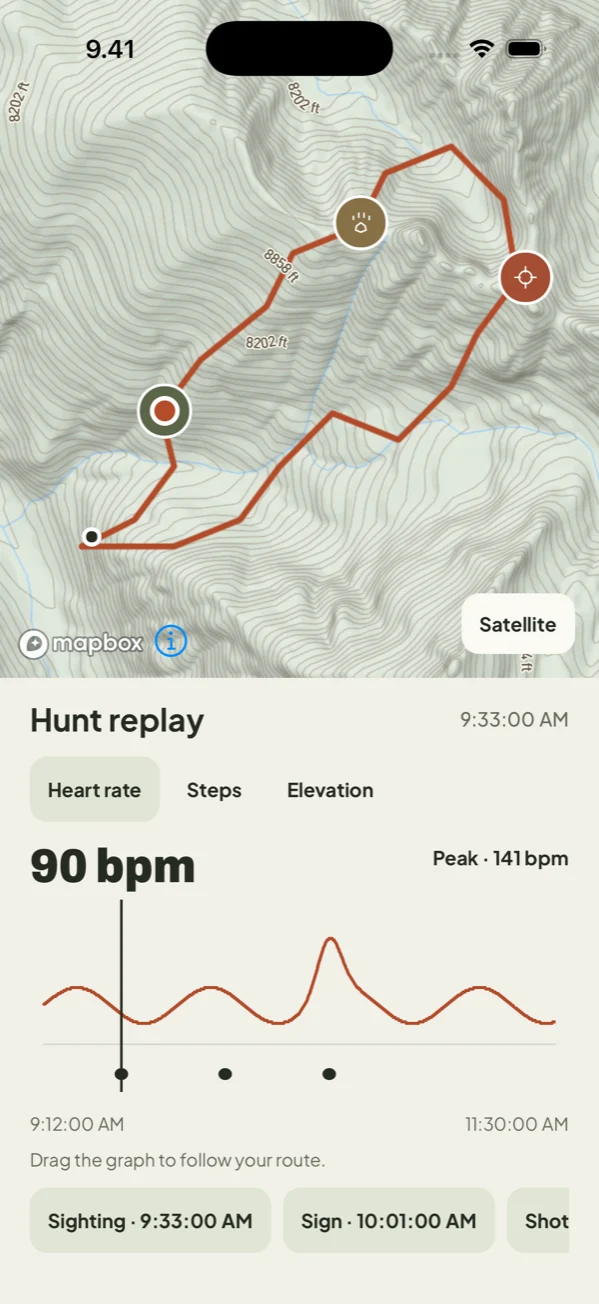
Follow your position through the hunt
Open a saved hunt on iPhone and choose the replay. Move along the graph to see the corresponding position on the map. The route and activity timeline help put a reading back in the context of the day.
Explore the recorded activity
Look at the available heart rate, steps, elevation and active-calorie information. Health readings depend on your permissions and the data delivered by Apple Watch. A gap or missing value is not the same as zero activity.
Keep an Apple Health workout
With permission, Hunter Watch can save a hunt to Apple Health as an outdoor hiking workout. Health access is optional. You can review or change permissions in your device’s Health and privacy settings.
Understand the limits of the data
GPS, elevation and activity measurements can be incomplete or inaccurate. Hunter Watch records and summarizes available readings; it does not assess your fitness, diagnose a condition or recommend exercise intensity. Use the information as a personal record.
Revisit the whole hunt
The saved hunt also holds your route and marked moments. Add photos on iPhone to remember details that a line on a map cannot show. Deleting a hunt from the diary does not delete its separately saved Apple Health workout.

iPhone + Apple Watch · Paid subscription